SSD vs HDD: Which Storage is Best for Your Laptop?
When planning to buy a new laptop in Wallington or Croydon, one of the most important decisions you’ll face is choosing between SSD (Solid State Drive) and HDD (Hard Disk Drive). Storage type directly affects your laptop’s speed, performance, and overall user experience. At Mobile Fix Wallington, we help customers make smart choices based on their needs and budget.
Understanding the Basics
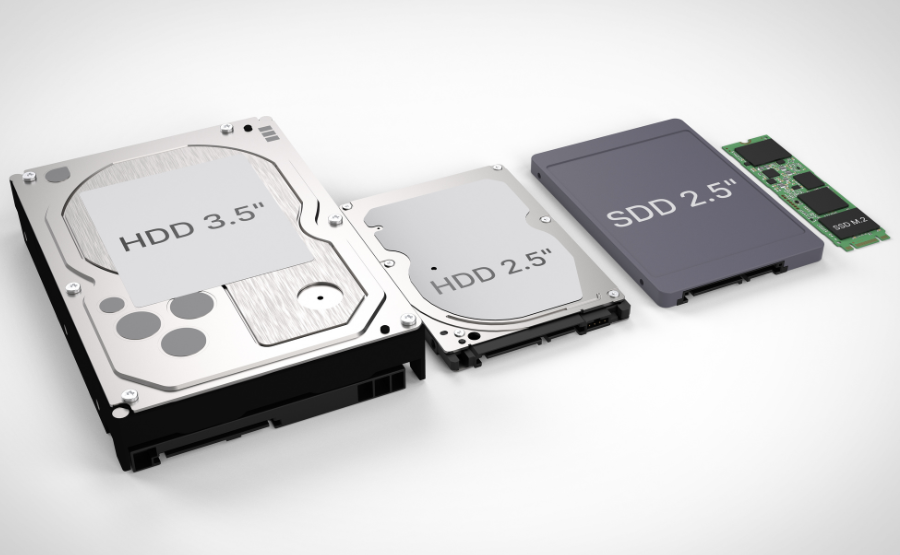
An HDD (Hard Disk Drive) is a traditional storage device that uses spinning disks to read and write data. It has been around for decades and is known for offering large storage capacity at a lower cost.
An SSD (Solid State Drive), on the other hand, uses flash memory with no moving parts. This makes it significantly faster, more durable, and energy-efficient compared to HDDs.
Speed and Performance
If speed is your priority, SSD is the clear winner. Laptops with SSD storage boot up in seconds, open applications instantly, and handle multitasking smoothly. Whether you’re working, gaming, or browsing, an SSD ensures a lag-free experience.
HDDs are slower because they rely on mechanical movement. Tasks like booting the system or loading heavy software can take noticeably longer. For basic usage like document storage or light browsing, HDD may still be acceptable.
Storage Capacity and Price
HDDs offer more storage space at a lower price, making them ideal for users who need to store large files such as videos, photos, or backups. You can easily find 1TB or 2TB HDDs at affordable rates.
SSDs, while faster, are generally more expensive per GB. However, prices have dropped significantly in recent years, making SSD laptops more accessible. Many modern laptops now come with at least 256GB or 512GB SSDs, which is sufficient for most users.
Durability and Reliability
Since SSDs have no moving parts, they are more resistant to physical damage. This makes them perfect for students, travelers, and professionals who carry their laptops frequently.
HDDs are more vulnerable to shocks and drops because of their mechanical components. Over time, this can lead to wear and tear, affecting performance and data safety.
Battery Life
Another advantage of SSDs is better battery efficiency. Laptops with SSD storage consume less power, helping extend battery life. If you’re always on the go, this can be a big benefit.
HDDs require more energy to spin the disks, which can slightly reduce battery performance.
Which One Should You Choose?
- Choose SSD if you want speed, performance, durability, and a modern computing experience. Ideal for students, professionals, gamers, and business users.
- Choose HDD if you need large storage on a tight budget and mainly use your laptop for basic tasks.
For many users, a combination of both (SSD for OS and HDD for storage) is also a great option.
Buy New Laptop in Wallington & Croydon
If you’re looking to buy a new laptop in Wallington or Croydon, choosing the right storage is just the first step. At Mobile Fix Wallington, we offer expert guidance to help you select the perfect laptop based on your usage and budget.
Whether you need a high-speed SSD laptop for work or a budget-friendly option with ample storage, our team ensures you get the best value. We also provide upgrade services, so you can switch from HDD to SSD anytime for better performance.
Final Thoughts
SSD has become the preferred choice for most laptop users. While HDD still has its place for bulk storage, SSD delivers unmatched speed, reliability, and efficiency.
Before making your purchase, consider how you plan to use your laptop. And if you need professional advice, Mobile Fix Wallington is here to help you make the right decision.
Upgrade smart, work faster, and enjoy a seamless laptop experience with the right storage choice.